If you’ve considered dipping your toes into the Google Ads waters, you’ve probably come across a few questions you’d like answered. Things like: How do I set up a campaign? and How much do Google Ads cost? Et cetera, et cetera.
But near the top of almost every business owner’s list of Google Ads–related questions when starting out is this: How long does it take for Google Ads to work?
At the end of the day, being able to get a campaign underway and having a rough budget estimate is all well and good—but if you don’t know how long it’ll take to see results, you’re likely to feel a little left in the dark. After all, time is money, right?
In this blog post, we’re going to walk you through some of the most important insights we’ve gained from managing Google Ads campaigns over the years—both for ourselves and for our clients. You’ll gain a clearer understanding of what to expect once your ads go live, so you’re not left scratching your head wondering whether you’re on track, falling behind, or ahead of schedule.
So dust off the cobwebs on your stopwatch and get ready, because you’re about to pick up some practical nuggets of information you can start implementing in your business right away.
A few things to bear in mind
Before we dive into timelines and schedules, it’s worth pointing out that there’s no one-size-fits-all answer to the question: “How long does it take for Google Ads to work?”
There are a lot of moving parts that influence how quickly you’ll start seeing meaningful results — things like your ad budget, how competitive your industry is, and what you’re actually trying to achieve with your campaigns.
Google Ads is a PPC platform, so yes — being willing to invest in competitive keywords and broader strategies early on can help accelerate results. But it’s not as simple as throwing more money at it.
How fast your campaigns perform is just as much about how they’re set up and optimised. Smart targeting, strong account structure, good landing pages, and the right bidding and messaging strategies often make a bigger difference than budget alone.
And that’s where a trusty digital marketing agency (like us) comes in handy 😉
We usually tell our clients to allow a minimum of three months before expecting to see truly meaningful results from their Google Ads campaigns.
That doesn’t mean nothing will happen in the first three months — it just means this early phase is about laying the right foundations.
The easiest way to think about it is like building a house.
If you rush the start, the foundations are shaky. But if you take the time to build the structure properly, everything you add on top is stronger, more stable, and built to last.
Your Google Ads campaigns work the same way.
Those first few months are spent structuring your account properly, testing messaging, learning what converts, refining targeting, and setting your campaigns up for long-term performance. Do that well, and you give yourself the best possible chance of owning the shiniest house on the street.
But it doesn’t stop there.
Anyone who’s built a home knows that over time, things wear down. Paint fades. Decking needs replacing. Rooms get refreshed.
Your Google Ads campaigns are no different.
Once your ads are live, you’re only just getting started. Ongoing optimisation is what keeps your campaigns competitive — refreshing ads, refining keywords, improving landing pages, adjusting bids, and constantly finding new ways to improve results.
So if you take one thing away from this, it’s this:
There is no finish line with Google Ads.
There is no such thing as “done”.
Your campaigns should be treated as a living, evolving system — not a set-and-forget task.
Why does it take so long for Google Ads to work?
Some of you might be thinking, “Three months?! I can’t wait that long…”
So why does it take so long?
And what should you actually be focusing on during this early groundwork stage?
One of the main reasons Google Ads takes around three months to really start working is because when you launch a campaign from scratch, there is no historical data to lean on.
Like we’ve already touched on, the key to running a strong Google Ads campaign is constant testing and optimisation. But it is hard to know what to adjust when there is no real performance data to work from.
Only once a campaign has been running for a while can you start pulling meaningful insights from your ads. And in the early stages, no matter how important this phase is, your data will naturally be limited, especially if you are operating in a smaller or more niche market.
Another thing to keep in mind while your campaigns are getting off the ground is how favourably ad networks view your ads.
Just like meeting someone for the first time, ad networks need time to get to know your ads. They want to understand how people interact with them so they can decide whether they can be trusted.
Once your ads get the green light, they start to perform better in auctions and are more likely to be shown to the right users. This leads to more clicks, more conversions, and more data to work with.
That data then allows you to refine things like your targeting, keywords, and messaging. As your ads become more relevant and gain traction, their quality score improves, which helps them perform even better in auctions.
And so the cycle continues.
What can you do to speed up your Google Ads results?
We get it. You want to see results fast. Who doesn’t?
But it’s worth knowing that there are certain parts of your campaign that have a big influence on how quickly results start coming through.
So let’s start by looking at a few of the things we focus on as an agency to help accelerate results.
Break the ice
Taking the time to properly understand what your business is trying to achieve is vital.
Getting clear on your goals, your competition, and your target market, including where they spend their time online, is key to making sure your campaigns are as targeted as possible from the very start.
Even if you are not working with an agency, having a clear picture of what success looks like for you is far smarter than jumping into Google Ads without a structured plan.
It will also save you a whole heap of time in the long run.
Technical bits and bobs
This is where we like to get a little geeky and dive into the finer details of your product or service.
We are talking about things like keyword research, website audits, and competitor analysis. All of this gives us a clear picture of what is needed to build a strong Google Ads strategy and set your campaigns up for success.
It is also important to know which key metrics to keep an eye on. Things like your average cost per click (CPC), click through rate (CTR), and return on ad spend (ROAS) give you a realistic benchmark for how your industry typically performs.
Whether you choose to partner with an agency or go it alone, make sure you have done your homework on the technical side of things. If not, you may end up retracing your steps further down the line.
Tweaking and optimising
By now you know that continual testing and optimisation is an essential part of any successful Google Ads campaign.
To put it another way, imagine trying to squeeze as much juice as possible out of a ripe citrus fruit.
You might start by cutting it in half and giving each side a good squeeze. Then you try twisting it. Then you cut it into smaller pieces to get more grip. You might even bring in both hands to squeeze out every last drop.
The point is, as you try to get more juice, you change your technique. That is exactly how you should approach Google Ads. By testing new tactics, refining what works, and constantly improving how your campaigns are run.
Unlike a real piece of fruit though, Google Ads never run out of juice. As long as you keep working your campaigns, there is always more performance to unlock.

But how do you know which squeezing techniques work best? The following four areas are a good place to start:
- Optimising bid strategy
- Changing targeting parameters
- Reviewing positive and negative keyword lists
- Checking for click fraud
While changing your targeting or tweaking your bid strategy can lead to improvements, there is never any guarantee. In some cases, you can end up wasting time going down an optimisation rabbit hole that an expert would have avoided.
This is where working with an agency can make a big difference.
Instead of trying to squeeze optimisation into an already busy schedule, an agency gives you access to a team of dedicated specialists whose sole focus is improving your campaigns and getting better results.
Know what Google likes and dislikes
Remember earlier when we touched on ad networks “getting to know” your ads?
Knowing exactly what Google likes and dislikes can have a big impact on how quickly you start seeing results from your campaigns.
Before giving your ads the thumbs up, Google looks at the following four components:
- Headline
- Ad description
- Keywords
- Landing Page
During this review process, Google is checking whether your ads are accurate, appropriate, and free from spam. The goal is to protect the user experience.
It looks at whether there is any offensive or restricted content, and whether your keywords and landing pages are genuinely relevant to what your ad is promising.
If Google is not happy with your ad, it will be flagged and changes will be requested before it can be approved. In some cases, your ad may be fully disapproved, which means you will need to rework it before it can go live.
You can see an overview of Google’s ad guidelines below, or check out their full advertising policies by clicking here.
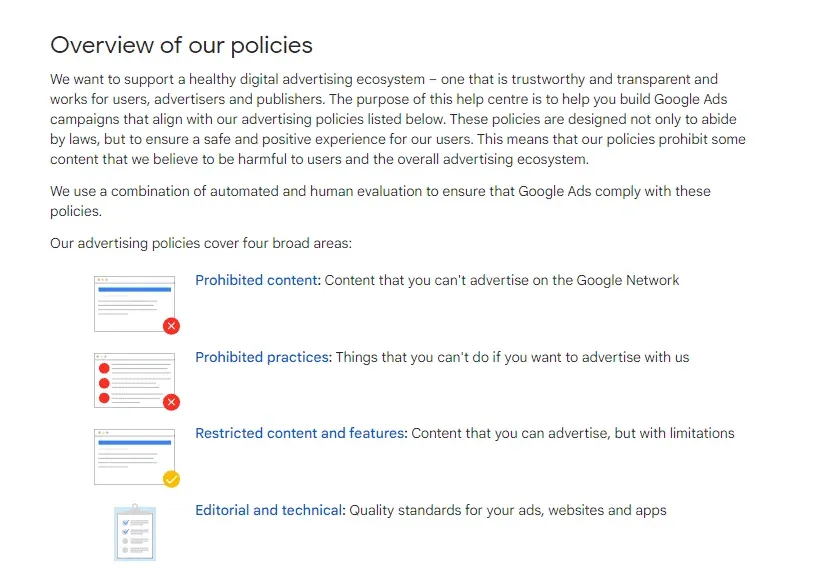
Source: Google
This is another area where working with a digital marketing agency adds real value, because they know what Google does and does not like.
When you work with an agency, your ads are far more likely to be approved straight away, as any potential issues should be picked up before submission. It is their job to stay on top of Google’s policy changes and make sure your campaigns stay compliant.
Time to test!
Now that you know how and why Google Ads campaigns take time to really get going, it is time to put it into action.
You know what influences the speed of your results, and you know there is no real finish line when it comes to optimisation.
You are ready to launch, test, tweak, and continually improve your ads while watching those conversions start rolling in.
And if you would like a second pair of eyes to make sure everything is watertight, why not get a free proposal from us?
We will review your campaigns and show you how to squeeze even more performance out of your Google Ads.